files in root directory —
.angular-cli.json— configuration for managing the build process and overallngcommands behaviour. we will keep returning to this file in the course of our application journey.karma.conf.js— karma test runner configuration, used when running unit testspackage.json— npm configuration that you must be familiar with. if not, take a quick look here. we can also write and run custom scripts from here. for eg. you can seestartscript defined asng serveso you can runnpm startwhich in turn will runng serve.protractor.conf.js— e2e test config for protractorREADME.md— documentation for our project. by default you can see all the available commands that we can run for our app. we should keep updating this, as and when required, for our specific application.tsconfig.json— typescript compiler configuration
src directory —
this is where our application code resides. here is how it should look as of now:
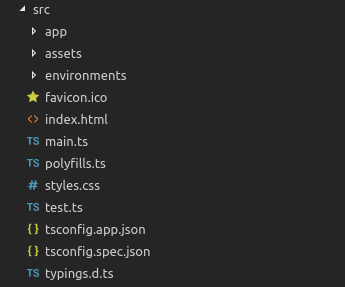
appdirectory — this contains our root moduleapp.module.tswhich is needed for application bootstrap and declares all the components used in our application. also, our root componentapp.component.tsreside here along with it’s template (app.component.html), style (app.component.css) and unit test (app.component.spec.ts). as we will write new components, we will see how those are nested inside our root app component.assetsdir — here we keep the assets like images, fonts etc that need to be copied as-is.environmentsdir — files for our target environments. we generally have different environment specific configs that are used during build, one example being which api end point is called for crud operations. this is where we define those configs.index.html— main html file which is served to browser. all the script and style references are injected by cli automatically here, so we do not need to edit this manually, almost ever.main.ts— this is the main entry point for our angular application and this is where application bootstrap method is called for our root module.
platformBrowserDynamic().bootstrapModule(AppModule)
polyfills.ts— polyfills to support all kind of browsers for a consistent user experience across browsers.styles.css— application global styles. remember, all the component specific style will be defined in corresponding component style files.